
For general troubleshooting of the Mother-32, we recommend the following steps in order:
TABLE OF CONTENTS
SysEx Software
Some of these troubleshooting steps requires the use of a SysEx software. This is a piece of software specifically designed for sending and receiving SysEx (.syx) files. These procedures specifically require sending the SysEx files from the software to the synth. Below are the two recommended SysEx software, and their associated method for setting up a MIDI output.
SysEx Librarian (Mac) - The synth will appear in the drop-down menu at the top of the screen.
Bome Send SX (Windows) - Go to MIDI Out and select the synth from the choices provided.
If you are having issues sending a SysEx file, a common solution can be to adjust the SysEx data transfer speed to transfer slower.
SysEx Librarian - Settings > Transmit Speed
Bome Send SX - Options > Settings > Actual MIDI Speed
INIT Patch Setup
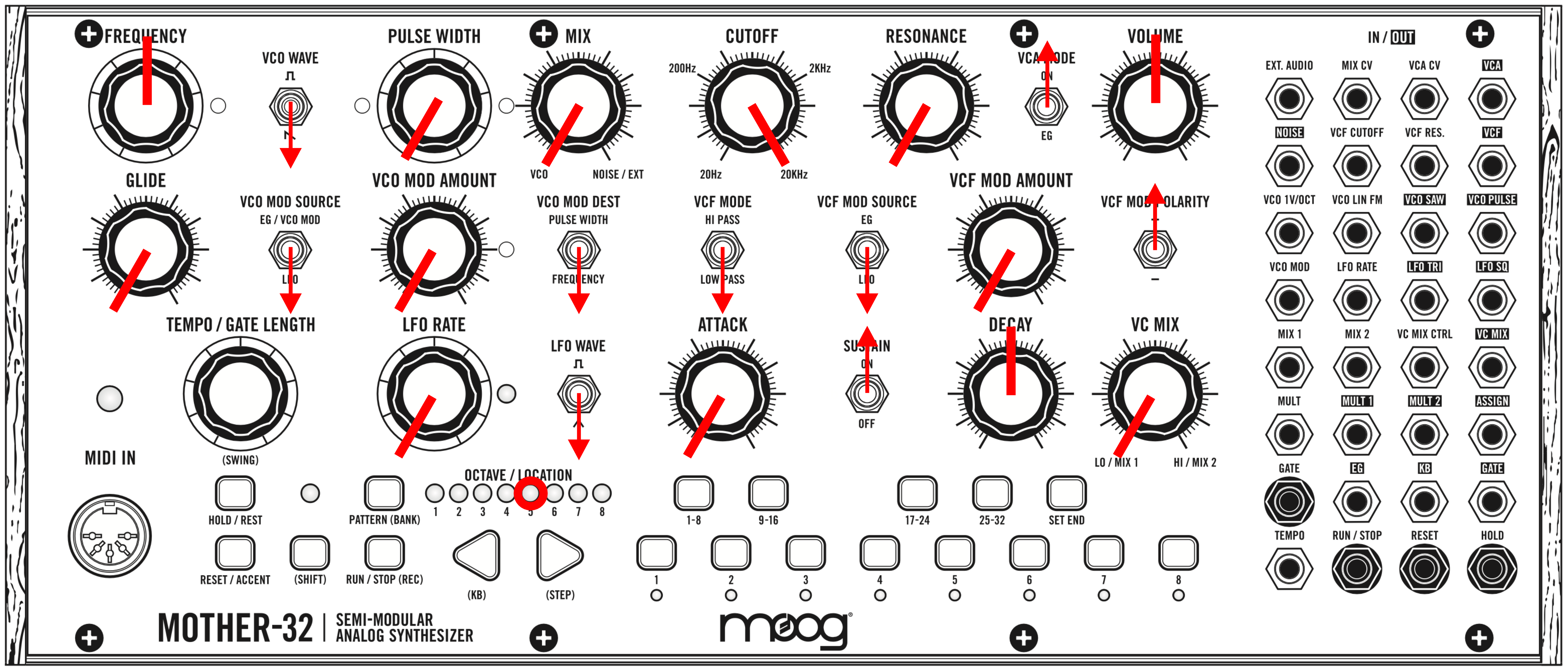
To rule out the possibility that your current patch is causing the problem, switch the synth to an INIT (initialized) patch. Set your panel to match the settings shown here:
Global Reset
- Download the SysEx files HERE.
- Connect your Mother-32 to your computer using a USB to MIDI cable or via your MIDI-enabled interface.
- Select the synth as your MIDI output device in the settings of your SysEx sending software.
- Copy "Mother32_restore_defaults" to your SysEx application’s library.
- Send "Mother32_restore_defaults" from your SysEx application to your Mother-32 via your USB MIDI interface.
- A video detailing the procedure can be found HERE.
Firmware Update
- Download the firmware update files & instructions HERE.
- Connect your Mother-32 to your computer using a USB to MIDI cable or via your MIDI-enabled interface.
- Select the synth as your MIDI output device in the settings of your SysEx sending software.
- Open the downloaded .zip file.
- Open the folder: “Mother-32_Firmware_v2.0”.
- Copy these files from the folder to your SysEx application’s library:
- Mother-32_ERASE_firmware.syx
- Mother-32_Firmware_v2_0_0.syx
- Send "Mother-32_ERASE_firmware.syx" from your SysEx application to your Mother-32 via your USB MIDI interface. Look for the Tempo LED to flash green/red; this means unit is now in boot-loader mode. The old firmware still needs to be erased.
- Send "Mother-32_ERASE_firmware.syx" a second time – you should see two slow red blinks from the Tempo LED, then it will flash green on/off. The old firmware is now erased and the unit is ready for new firmware.
- Send new main firmware "Mother-32_Firmware_v2_0_0.syx". Observe the MIDI LED flashing red and the Tempo LED flashing yellow during transfer.
- On completion, the Tempo LED will flash green 2-3 times and the unit will.
- A video detailing the procedure can be found HERE.
A guide on how to send SysEx files to your synthesizer can be found HERE.