If the pads on your MASCHINE controller are not responding as expected, you can recalibrate them by following the steps below.


1. Open Preferences in MASCHINE 2 and navigate to Hardware > Pad Sensitivity.


2. Use the Sensitivity slider to adjust how the pads respond to your touch.


This setting controls the threshold at which a pad hit is detected. Gradually move the slider from right to left until you find a level that feels comfortable for your playing style. The configuration shown in the image below can be used as a helpful reference point.
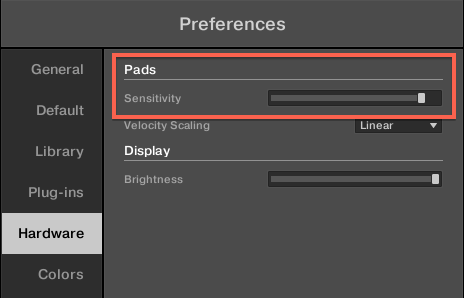

If your MASCHINE Controller's Pads do not react as expected or become irresponsive, it can be helpful to recalibrate them by adjusting their Sensitivity.
  1. Launch MASCHINE 2 and go to Preferences > Hardware > Pad Sensitivity.
  2. Use the Sensitivity slider to adjust how sensitive the pads respond to your touch. This sets the minimum threshold at which the MASCHINE controller will register a hit. Move the slider gradually from the right to the left until you find a setting which suits you best. The setting below is a good reference point: