
This article applies to all Komplete Kontrol keyboard models (A-Series, M32, S-Series MK1 / MK2) and Maschine MK3.
TABLE OF CONTENTS
Symptom
Komplete Kontrol / Maschine MK3 hardware loses host integration functionality in GarageBand / Logic Pro.
Solution
Before proceeding, please see this info to determine if this issue applies to your specific computer and GarageBand / Logic Pro version:
- If using an Apple Silicon-based Mac, this solution applies to both GarageBand and Logic Pro (10.6 and newer). Host integration on earlier Logic Pro versions is not supported.
- If using an Apple Intel-based Mac, this solution applies only to GarageBand 10.4.4 and newer.
- Please see this article from Apple Support to find your computer's processor type.
Follow these steps to restore host integration on your Komplete Kontrol / Maschine MK3 device:
- Disconnect your Komplete Kontrol / Maschine MK3 controller from the computer.
- Make sure that the latest update of the Komplete Kontrol / Maschine software is installed in Native Access.
- Check for the latest GarageBand or Logic Pro update at the Mac App Store. If an update is available, install it now.
Note: On Apple Silicon computers, NI Hardware / Host Integration requires Logic Pro 10.6 or newer.
- Start Finder and open the following location:
Macintosh HD > Library > Application Support > MIDI Device Plug-Ins - Delete these files from the MIDI Device Plug-Ins folder:
- Komplete Kontrol A-Series.bundle
- Komplete Kontrol S-Series.bundle
- Maschine MK3.bundleNote: Enter your computer's password when prompted.
- Go to this location:
Macintosh HD > Library > Audio > *MIDI Device Scripts*Note: Create the MIDI Device Scripts folder if it doesn't exist.
- In the MIDI Device Scripts folder, create a new sub-folder called Native Instruments (if needed). Your folder path should now be:
Macintosh HD > Library > Audio > MIDI Device Scripts > Native Instruments - Download the Zip file (Native Instruments MIDI Device Scripts.zip) attached at the end of this article.
- Unzip the file and move its contents to the Native Instruments folder.
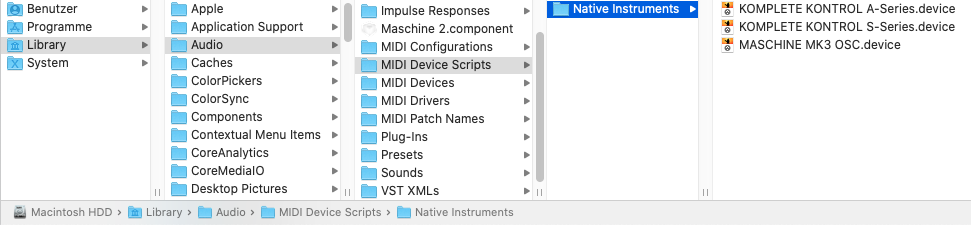
Important note: If you reinstall or update Komplete Kontrol or Maschine, you must repeat the above steps.
- Reconnect your Komplete Kontrol / Maschine MK3 hardware to the computer and relaunch GarageBand / Logic Pro.
- Click Connect to allow your NI Hardware to communicate with Garageband / Logic Pro.
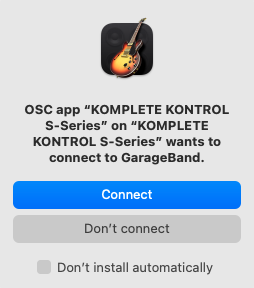
Your Komplete Kontrol / Maschine MK3 Host transport control features should now be available in GarageBand / Logic Pro.
Updating from GarageBand to Logic Pro
If you primarily use GarageBand and later decide to purchase Logic Pro, you would need to remove and reinstall the Komplete Kontrol / Maschine software. This is for technical reasons, and we apologize for any inconvenience.
Please follow this article for instructions to fully uninstall the Komplete Kontrol / Maschine software. After a restart, you can install it again from Native Access.