
AIR Music Tech では、macOS 26 Tahoe の各ベータ版リリースごとに、該当するすべてのソフトウェア製品について継続的にテストを実施しています。新しいアップデートへ移行する前に、「何が動作するのか」を正確に把握することが、すべてのユーザーにとって重要であると考えています。macOS 26 Tahoe における AIR Music Tech ソフトウェアの互換性については、本記事をご参照ください。
対応ソフトウェア(Supported Software)
macOS 26 Tahoe に関する互換性テストは、Intel プロセッサおよび標準構成の Apple Silicon プロセッサを使用して実施しています。
下記に記載のない製品は、macOS 26 Tahoe システムまたは Apple Silicon プロセッサ環境では 非対応 とみなされます。
AIR Instrument Plugins | ||||||||
| Product | Version | Intel Processor | Apple Silicon | VST2 | VST3 | AU | AAX | Auth Type |
| Bassline | 1.2.1.14 | Supported | Supported | ✓ | ✓ | ✓ | ✓ | inMusic |
| DrumSynth | 1.2.1.14 | Supported | Supported | ✓ | ✓ | ✓ | ✓ | inMusic |
| Electric | 1.2.1.14 | Supported | Supported | ✓ | ✓ | ✓ | ✓ | inMusic |
| Essential Keyboards | 2.1.1 | Supported | Supported | ✓ | ✓ | ✓ | ✓ | inMusic |
| Fabric Collection | 1.2.1.14 | Supported | Supported | ✓ | ✓ | ✓ | ✓ | inMusic |
| Flavor Pro | 1.2.0.8 | Supported | Supported | ✓ | ✓ | ✓ | ✓ | inMusic |
| Hype | 1.2.1.14 | Supported | Supported | ✓ | ✓ | ✓ | ✓ | inMusic |
| Iona | 1.0.0.30 | Supported | Supported | ✓ | ✓ | ✓ | ✓ | inMusic |
| Jura | 1.2.1.14 | Supported | Supported | ✓ | ✓ | ✓ | ✓ | inMusic |
| Mellotron | 1.2.1.14 | Supported | Supported | ✓ | ✓ | ✓ | ✓ | inMusic |
| Mini D | 1.2.1.14 | Supported | Supported | ✓ | ✓ | ✓ | ✓ | inMusic |
| Odyssey | 1.2.1.14 | Supported | Supported | ✓ | ✓ | ✓ | ✓ | inMusic |
| OPx-4 | 1.2.1.14 | Supported | Supported | ✓ | ✓ | ✓ | ✓ | inMusic |
| Organ | 1.2.1.14 | Supported | Supported | ✓ | ✓ | ✓ | ✓ | inMusic |
| Ring The Alarm | 1.0.0.41 | Supported | Supported | ✓ | ✓ | ✓ | ✓ | inMusic |
| Solina | 1.2.1.14 | Supported | Supported | ✓ | ✓ | ✓ | ✓ | inMusic |
| Stage EP | 1.2.1.14 | Supported | Supported | ✓ | ✓ | ✓ | ✓ | inMusic |
| Stage Piano | 1.2.1.14 | Supported | Supported | ✓ | ✓ | ✓ | ✓ | inMusic |
| Studio Strings | 1.2.1.14 | Supported | Supported | ✓ | ✓ | ✓ | ✓ | inMusic |
| Sub Factory | 1.2.1.11 | Supported | Supported | ✓ | ✓ | ✓ | ✓ | inMusic |
| TimewARP 2600 V2 | 2.0.1.16 | Supported | Supported | ✓ | ✓ | ✓ | ✓ | inMusic |
| TubeSynth | 1.2.1.14 | Supported | Supported | ✓ | ✓ | ✓ | ✓ | inMusic |
AIR Effects Plugins | ||||||||
| Product | Version | Intel Processor | Apple Silicon | VST2 | VST3 | AU | AAX | Auth Type |
| Tape Double Track | 1.0.0.25 | Supported | Supported | ✓ | ✓ | ✓ | ✓ | inMusic |
| Fly Tape II | 1.0.0.27 | Supported | Supported | ✓ | ✓ | ✓ | ✓ | inMusic |
| Lo-Fly Dirt | 1.0.0.55 | Supported | Supported | ✓ | ✓ | ✓ | ✓ | inMusic |
| Multiband Filterbank | 1.0.0.37 | Supported | Supported | ✓ | ✓ | ✓ | ✓ | inMusic |
| Creative FX Collection 2 | 1.2.1.14 | Supported | Supported | ✓ | ✓ | ✓ | ✓ | inMusic |
| Soft Clipper | 1.2.0.8 | Supported | Supported | ✓ | ✓ | ✓ | ✓ | inMusic |
| Jura Chorus | 1.2.0.10 | Supported | Supported | ✓ | ✓ | ✓ | ✓ | inMusic |
| Ether | 1.2.0.10 | Supported | Supported | ✓ | ✓ | ✓ | ✓ | inMusic |
| Sprite | 1.2.0.10 | Supported | Supported | ✓ | ✓ | ✓ | ✓ | inMusic |
| Delay Pro | 1.2.0.5 | Supported | Supported | ✓ | ✓ | ✓ | ✓ | inMusic |
| Vocal FX Collection | 1.2.1.14 | Supported | Supported | ✓ | ✓ | ✓ | ✓ | inMusic |
| Flex Beat | 1.1.0 | Supported | Supported | ✓ | ✓ | ✓ | ✓ | inMusic |
| Flavor Pro | 1.2.0.8 | Supported | Supported | ✓ | ✓ | ✓ | ✓ | inMusic |
Classic AIR Instruments & Effects Plugins | ||||||||
| Product | Version | Intel Processor | Apple Silicon | VST2 | VST3 | AU | AAX | Auth Type |
| AIR Creative FX Collection Plus | 2.0.0 | テスト中 | テスト中 | ✓ | ✓ | ✓ | * | inMusic |
| Boom | 1.4.0 | テスト中 | テスト中 | ✓ | ✓ | ✓ | * | inMusic |
| DB33 | 1.4.0 | テスト中 | テスト中 | ✓ | ✓ | ✓ | * | inMusic |
| Hybrid 3 | 3.2.0 | テスト中 | テスト中 | ✓ | ✓ | ✓ | ✓ | inMusic |
| Loom II | 2.2.0 | テスト中 | テスト中 | ✓ | ✓ | ✓ | ✓ | inMusic |
| Mini Grand | 1.4.0 | テスト中 | テスト中 | ✓ | ✓ | ✓ | * | inMusic |
| Strike | 2.6.0 | テスト中 | テスト中 | ✓ | ✓ | ✓ | ✓ | inMusic |
| Structure | 2.2.0 | テスト中 | テスト中 | ✓ | ✓ | ✓ | ✓ | inMusic |
| The Riser | 1.2.0 | テスト中 | テスト中 | ✓ | ✓ | ✓ | ✓ | inMusic |
| Transfuser | 2.2.0 | テスト中 | テスト中 | ✓ | ✓ | ✓ | ✓ | inMusic |
| Vaccum Pro | 1.2.0 | テスト中 | テスト中 | ✓ | ✓ | ✓ | ✓ | inMusic |
| Velvet | 2.2.0 | テスト中 | テスト中 | ✓ | ✓ | ✓ | ✓ | inMusic |
| Xpand!2 | 2.4.0 | テスト中 | テスト中 | ✓ | ✓ | ✓ | * | inMusic |
| Vacuum Classic | 1.4.0 | テスト中 | テスト中 | ✓ | ✓ | ✓ | * | inMusic |
- 「テスト中」と記載されているタイトルは、現時点ではまだ「正式に」互換対応が確認されていません。
- * - AAX は Avid Link 経由で提供されています。詳細は こちらをクリックしてご確認ください。
- Classic AIR Plugins の inMusic 認証についての詳細は、この サポートページ をご参照ください。
システムが自動的に更新されないようにするにはどうすればよいですか?
お使いのオペレーティングシステムが自動アップデートに対応していないことを確認してください。これは一部の人にとっては便利な機能ですが、ソフトウェアツールの安定性を重視する方は、システムにインストールする基本オペレーティングシステムを自分で管理することが望ましいでしょう。
自動アップデートでは、アップデート前にソフトウェアの互換性が考慮されないため、お使いの機器がオペレーティングシステムの変更に対応していない場合、安定性やその他の機能に問題が発生する可能性があります。
遅延やダウンタイムを避けるため、アップデートの決定は慎重に行い、アップデート前にすべてのソフトウェアツールの互換性を確認することをお勧めします。macOSの自動アップデートを無効にするには、以下の手順に従ってください。
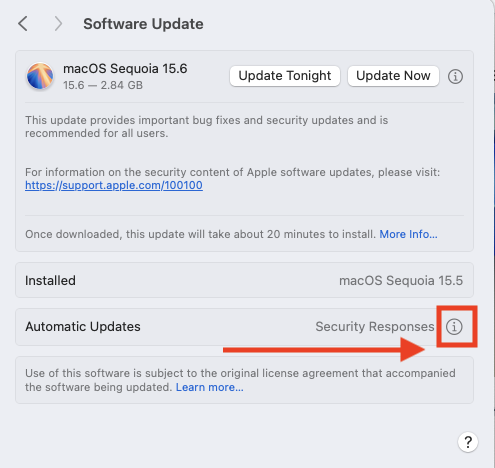
- システム設定 > 一般 > ソフトウェアアップデートに移動します
- 自動更新の横にある情報(i)アイコンをクリックします。
- 以下のすべてのボックスのチェックを外してください。
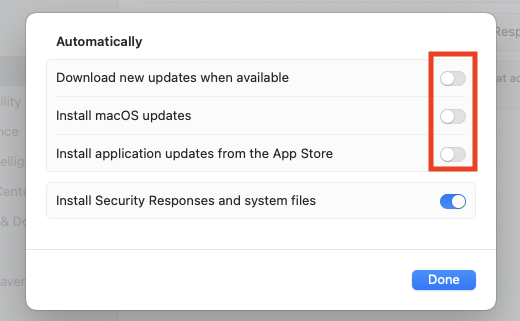
- 変更を適用するには「完了」をクリックします