
This article explains how to send the audio signal from different instruments in a Kontakt rack to separate channels in your DAW. Each of these channels can then be individually processed and mixed with effects in the DAW. You will be guided through the following steps:
Follow these instructions to configure Kontakt for use with multiple outputs:
- Configuration of Kontakt output channels
- Assignment of instruments to separate output channels in Kontakt
Configuration of Kontakt output channels
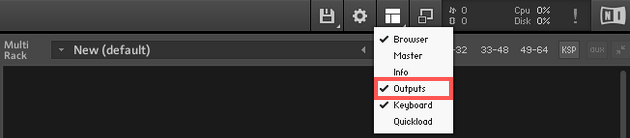
- Load Kontakt and in Kontakt's Workspace menu, check the box next to Outputs to display the Outputs section.
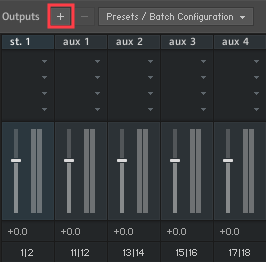
- The Outputs section is now displayed in the lower half of the rack. Click ' + ' next to Outputs to open the Outputs dialog.
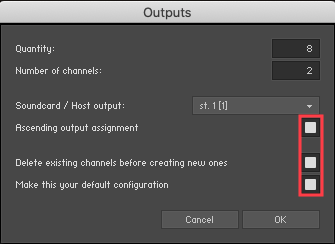
- Additional Kontakt output channels can be created in this menu.
- Quantity determines the number of contact outputs you want to add.
To do this, click in the Quantity field and drag the mouse pointer up/down. - With "Number of channels" you can select the channel configuration for all new Kontakt outputs (e.g., 1 for mono or 2 for stereo).
In our example, we want to route 8 Kontakt instruments to 8 stereo outputs. So we select 8 for "Quantity" and 2 for "Number of channels ".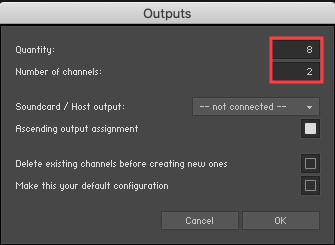
- Quantity determines the number of contact outputs you want to add.
- For Soundcard / Host output, select st. 1 [1].
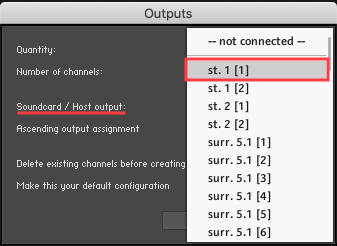
- Ascending output assignment (assigns each new channel to the next available outputs).
- Delete existing channels before creating new ones (creates new output channels).
- Make this your default configuration (saves the setup for future Digital Performer projects). - Click OKto confirm.
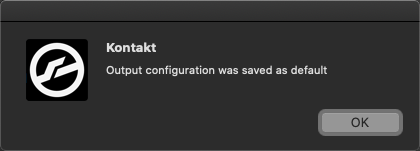
If you have correctly followed the steps above, the message "Output Configuration was saved as default" will appear. Click OK to continue.
The Kontakts Outputs section now displays the 8 Master Channel Outputs, each routed to a different stereo output in your DAW.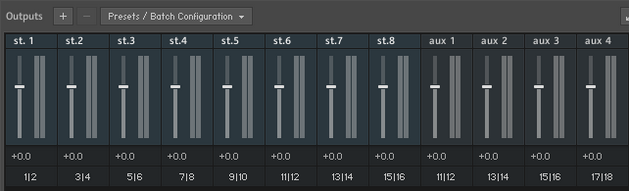
Assignment of instruments to separate output channels in Kontakt
- Now you can route all the instruments you've loaded into the Kontakt Rack to separate output channels. When you load an instrument into the Rack, it's initially automatically assigned to the first stereo output channel, St.1. In the header of each instrument, select the desired output channel. In this example, an instrument from Kontakt Retro Machines is sent to output st.2 [2 ch. routed 3|4] .
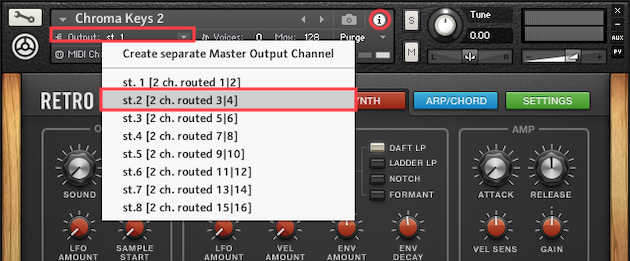
- Repeat this process for all instruments loaded in the rack, selecting one available stereo output channel at a time.
Multi-output configuration and routing in your DAW
Define the outputs of the Kontakt instrument and route them to the inputs of the audio tracks in your DAW. The Kontakt instrument will then be played back through these audio tracks.
Since the multi-output configuration process differs for each host, please consult your DAW's manual for further information on the process.