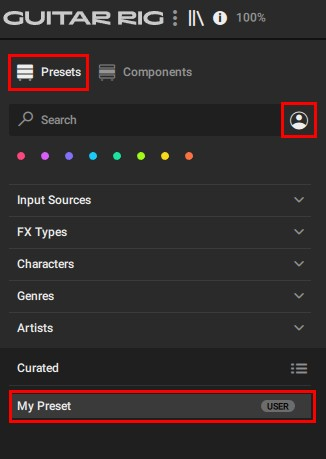
In order to load a preset in Guitar Rig Pro, it is necessary to have all components installed which are used by this preset. If a component required by the preset is missing, it won't work.
A large variety of Guitar Rig Pro User Presets is available under the following LINK.
Importing User Presets from Guitar Rig 6
- Open the stand-alone version of Guitar Rig.
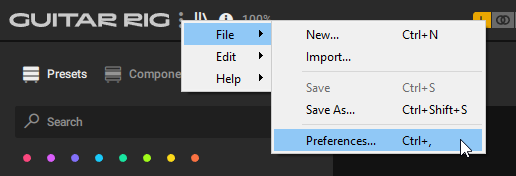
- Open File > Preferences:
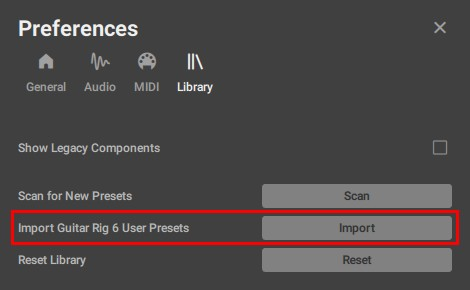
- In the Library tab, click Import:
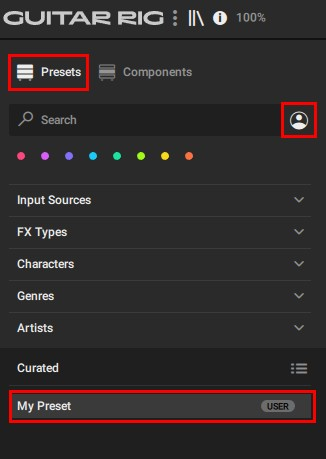
- After importing the preset, you will find it in the User Presets area of the Guitar Rig browser:
Manually importing User Presets
You can import Guitar Rig 5 and all other User Presets manually:
- Open the stand-alone version of Guitar Rig.
- Open File > Import...
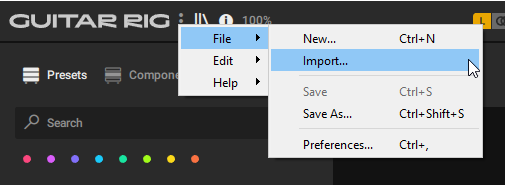
- Navigate to the folder where you stored the preset. Select it and click Open. Please note that you can only import one preset at a time.
These are the default folders for Guitar Rig User Presets:
Guitar Rig 5:
Win: C: > Users > *your username* > Documents > Native Instruments > Guitar Rig 5 > Sounds
macOS: Macintosh HD > Users > *your username* > Documents > Native Instruments > Guitar Rig 5 > Sounds
Guitar Rig 6:
Win: C: > Users > *your username* > Documents > Native Instruments > User Content > Guitar Rig 6 > Rack Presets
Mac: Macintosh HD > Users > *your username* > Documents > Native Instruments > User Content > Guitar Rig 6 > Rack Presets - After importing the preset, you will find it in the User Presets area of the Guitar Rig browser.