
Monark is an emulation of a well-known classical synthesizer, whose Pitch Bend Range was limited to plus/minus 7/9 semitones. This article explains how to edit the Monark Ensemble in order to achieve a Pitch Bend Range of plus/minus one octave.
- Start Reaktor and load the Monark Ensemble.
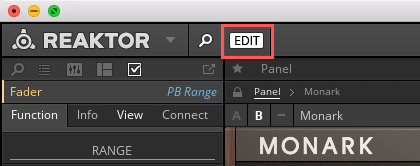
- Switch to EDIT mode.
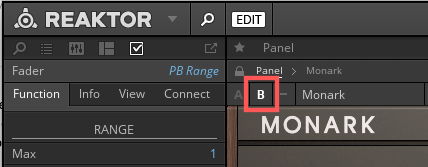
- Click on the B-View button to see Monark's back panel.
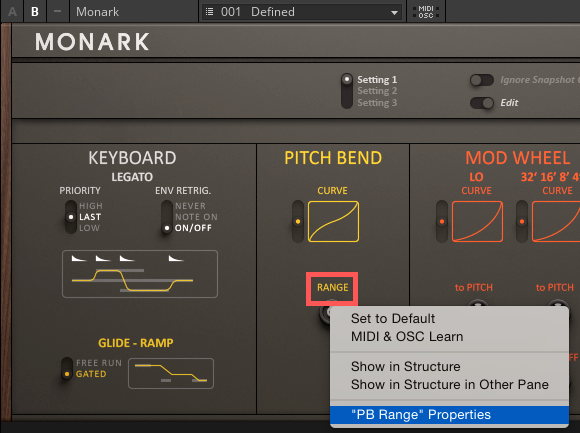
- Right-click on the Pitch Bend RANGE knob and select "PB Range" Properties.
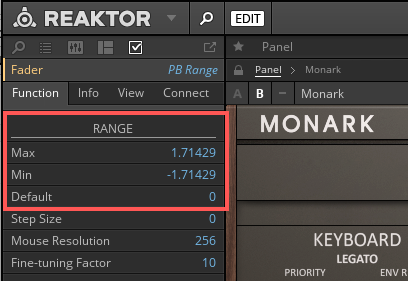
- In the Function Tab of the Properties, go to RANGE and set the Max to 1.71429, Min to -1.71429, and Default to 0, as shown in the screenshot below.
- In Monark's B-view, turn the Pitch Bend RANGE Knob all the way clockwise.
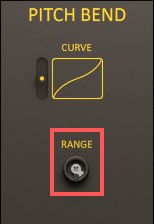
Monark's Pitch Bend Range is now set to plus/minus one octave. Do not forget to save your Monark Ensemble if you want to use these settings in the future.