
This guide explains how to record automation for Native Instruments plug-ins in Ableton Live using the Automation Arm function.
Record Automation in Ableton Live
To record automation follow these steps:
- Press the Automation Arm button.

- Press the Arm Recording button on the track where your NI plug-in is loaded and start recording by pressing the Record button in the transport section.
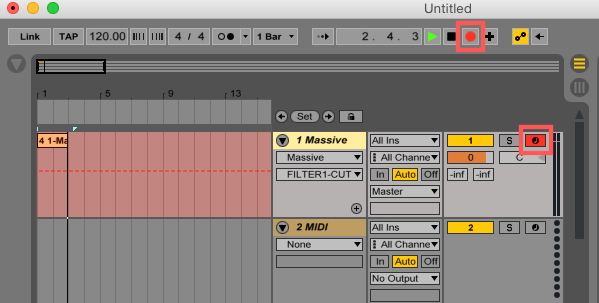
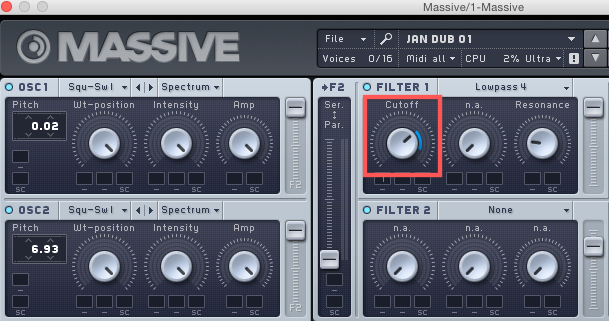
- Move the parameter you want to automate in your NI plug-in's window. In this example, we change manually the FILTER 1 Cutoff frequency in Massive.
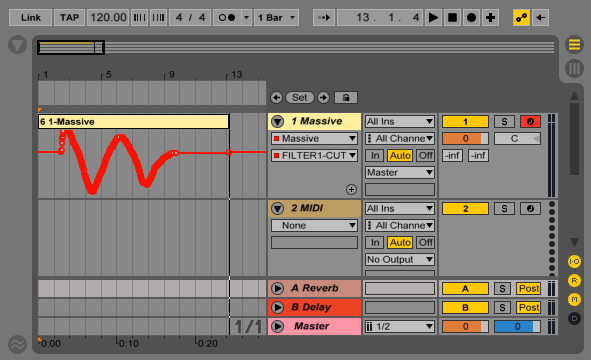
- Stop the recording. You will see the automation curve for the respective parameter, in our example FILTER 1 CUTOFF, in the Arrangement View.
To learn more about automation in Ableton Live, please read 'Chapter: Automation and Editing Envelopes' in the Ableton Live User manual. The manual is available from the Help menu within the Ableton Live application.