
You can adjust the brightness settings for your MASCHINE console from the Hardware tab in the Preferences menu. Please see the screenshots below for reference.
TABLE OF CONTENTS
MASCHINE MK3
Open MASCHINE 2's Preferences, then select the Hardware tab.
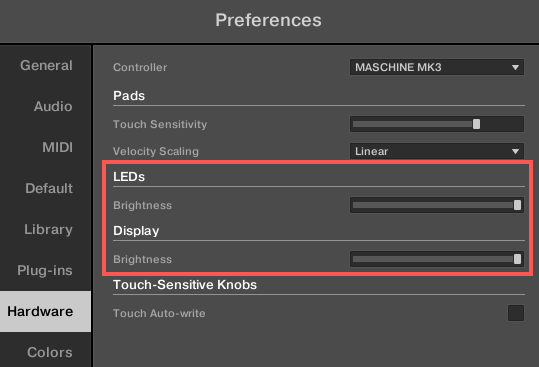
- Use the Display slider to adjust the brightness of the display.
- Use the LEDs slider to set the pad brightness.
You can also increase the overall brightness of the MASCHINE MK3's displays and pads by connecting the power supply unit.
MASCHINE STUDIO
Open MASCHINE Studio's Preferences, then select the Hardware tab.
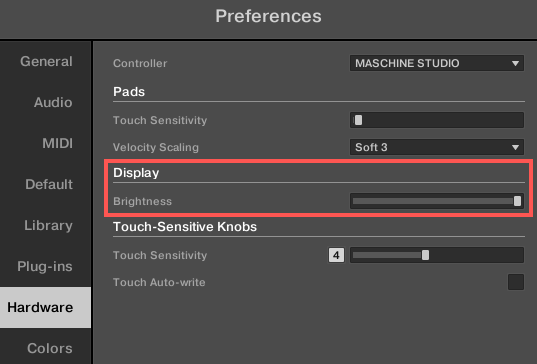
- Use the Display slider to adjust the displays' brightness.
MASCHINE MK1 / MK2 / MIKRO
Navigate to Preferences, then select the Hardware tab.
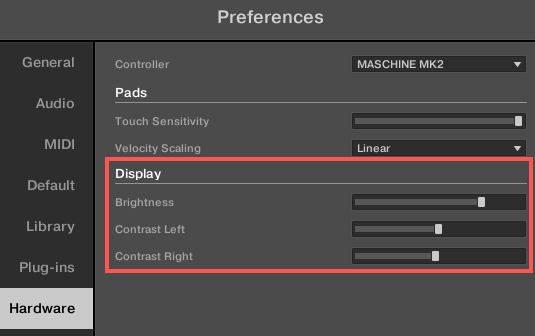
- Use the Display slider to adjust the displays' brightness.