
TABLE OF CONTENTS
Symptom
After the installation of TRAKTOR PRO 3 and setting up the TRAKTOR KONTROL S2 MK3 / S4 MK3 / S3 controller, you hear no sound when playing a track and cannot select an ASIO driver in TRAKTOR's preferences.
Cause
Unlike former TRAKTOR controllers, the S2 MK3 / S4 MK3 / S3 uses Windows' own 'WASAPI (Exclusive)' driver. In order to be able to use this WASAPI driver, the latest Windows 10 update (64-bit) needs to be installed.
Solution
- Install the latest update for Windows 10 (64-bit). You can find this option in: Settings > Updates & security > Windows Update > Check for Updates
- Connect your S2 MK3 /S4 MK3 / S3 and start TRAKTOR PRO 3
- Open Preferences > Audio Setup
- Click the drop down menu next to Audio Device and select:
Traktor Kontrol S2 MK3 (WASAPI (Exclusive Mode)) or
Traktor Kontrol S4 MK3 (WASAPI (Exclusive Mode)) or
Traktor Kontrol S3 (WASAPI (Exclusive Mode))
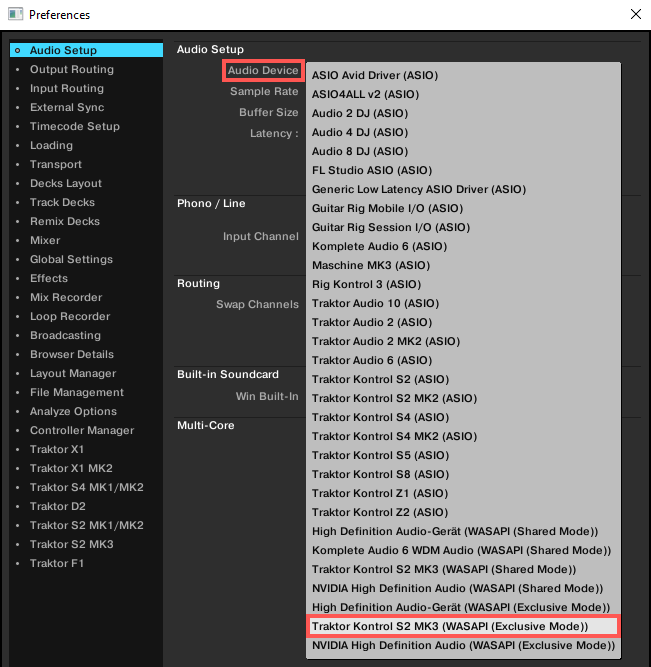
Now the TRAKTOR KONTROL S2 MK3 / S4 MK3 / S3 should work as expected.
Note: If you are experiencing high latency with your TRAKTOR KONTROL S2 MK3 / S4 MK3, you can try to reduce it by installing the ASIO driver. You can find the driver installer here:
- C: > Program Files > Native Instruments > Traktor Pro 3 > Drivers
After the installation you can select the ASIO driver in TRAKTOR's Preferences > Audio Setup.