
This article explains how to move the MASCHINE Factory Library to a different location on your computer. This can be useful if you want to free up space on your system drive or store your library on an external drive for easier management. Please follow the steps below to get started:
1. If you have not already installed the MASCHINE Factory Library or Expansion Pack on your external hard drive, copy the whole directory to the external drive now.
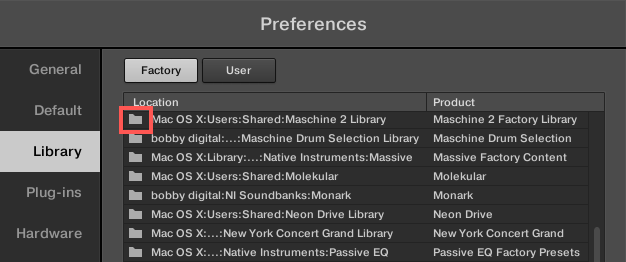
2. Open MASCHINE's Preferences, go the the Library tab, then click on the small Directory icon next to the Maschine 2 Factory Library path.
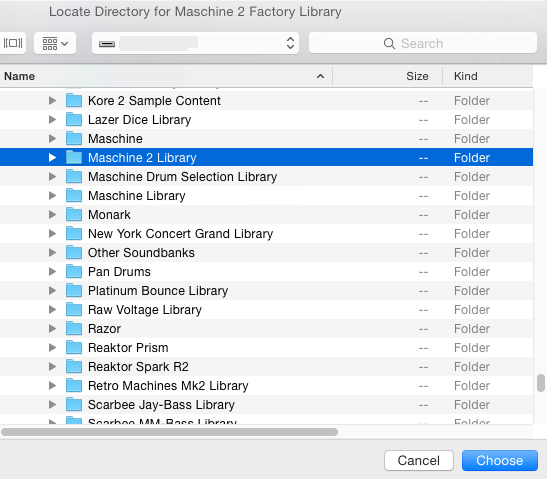
3. In the Locate Directory for Maschine 2 Factory Library dialog, select the Maschine 2 Library directory on your external drive and press Choose.
4. Once the new path is selected, you may be prompted to enter your computer's administrator password if you are on OS X. After doing this MASCHINE will update its Database to include the MASCHINE Factory Library's new location.
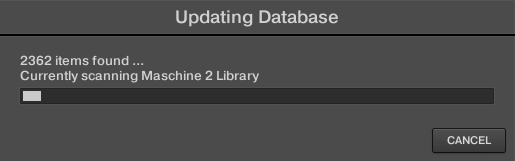
After the process is complete, your MASCHINE Factory Library will be fully accessible from its new location. You can now use MASCHINE as usual, with all sounds and content loading from the updated path.