
After updating or reinstalling Vinyl through Native Access, you may notice that the VST2 plugin is no longer visble on your Windows computer.
This happens because Native Access installs Vinyl to the default VST location:
C:\Program Files\Steinberg\VstPlugins
This occurs regardless of any custom VST2 paths set in the preferences. During this process, any existing VST2 installation in a previously selected custom location may be removed.
To restore the plugin to your preferred location, please follow the steps outlined below:
1. Close Native Access and all audio applications.
2. Click here to download the Vinyl installer and unzip it.
3. Run the installer.
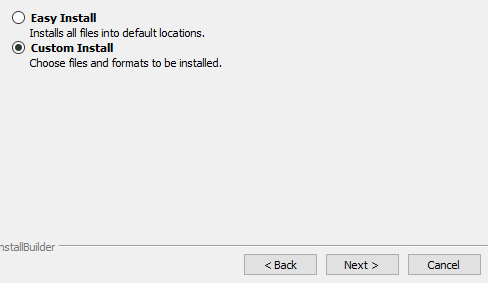
4. When prompted, select Custom Install:
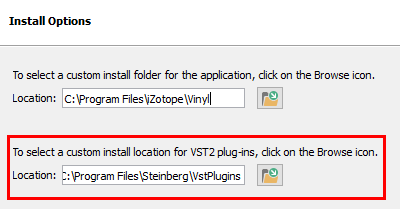
5. On the Install Options screen, select your custom install location for VST2 plug-ins
After installation, you will be able to use both the VST2 and VST3 versions of the Vinyl plugin again.