

Hardware (Engine OS)

New Features
- On‑device Stem Rendering for RANE SYSTEM ONE - For the first time on DJ hardware, stems can be rendered directly on the device—with no computer required.
- RGB Waveforms on All Engine DJ Devices - Choose between Engine’s classic tri‑band waveforms or full‑color RGB waveforms.
- On‑device Track Star Ratings - Quickly rate tracks directly from the Library or Performance views.
- Redesigned Source Menu - The Quick Source selector and the full‑screen Source Menu are now connected, delivering a more modern, streamlined music source selection experience.
- Pre‑rendered Demo Tracks for Stems - Demo tracks now ship with stems pre‑rendered on the following devices:
- RANE SYSTEM ONE
- Denon DJ PRIME 4+
- Denon DJ PRIME GO+
- Denon DJ SC LIVE 2 / SC LIVE 4
- Numark Mixstream Pro+
- Numark Mixstream Pro Go
- Browse Encoder Turn Behavior Setting - Added a preference to choose whether turning the Browse encoder opens the library or zooms the waveform.
Improvements and Fixes
- Expanded the beat range to 32 beats for Reverb Rise and Reverb Drop effects.
- Redesigned system dialog boxes and enabled interaction using the Browse encoder.
- Main VU meters now correctly display mono output on Denon DJ SC LIVE 2 / SC LIVE 4 and Numark Mixstream series units.
- Album art is now stored in a dedicated folder rather than within the database file. This migration occurs when:
- Importing tracks into Engine DJ
- Packing or exporting to a drive
- Running the Run Cleanup database optimization in Engine DJ Desktop
- Loading tracks from Folder View on an Engine OS device
- Improved Engine Lighting mixing on four‑deck devices with new crossfader‑based lighting mixing and enhanced upfader behavior.
- Fixed an issue where headphone gain did not adjust output volume on Denon DJ PRIME 4 and PRIME 4+.
- Fixed alignment issues between beat grids and waveforms.
- Pressing CUE after track runout now returns the playhead to the existing cue point instead of setting a new one on Denon DJ SC5000M and SC6000M.
- Adjusted Bluetooth device volume label text for clarity.
- Added the ability to load a track into an empty Sample Pad when focus is on Browse or Performance Library views.
- Tightened the Echo Out trigger point to more accurately cut the dry signal between 49%–51%.
- Improved Amazon Music Unlimited track download speeds and switched from concurrent to sequential downloads for better reliability.
- Reduced the time required when switching between music sources.
- Improved Touch FX popup layout.
- Updated Over‑the‑Air (OTA) update popups and update screen UI.
- Refined color‑fading behavior in the Micro Deck UI.
- Added additional padding for track length in Track Info view.
- Fixed an issue where jog wheel displays could get stuck during initialization on Denon DJ PRIME 4+.
- Fixed missing microphone settings on Denon DJ PRIME 4+.
- Fixed an issue where some stems tracks did not display the stems icon when packed to an external drive.
- Fixed an issue where Auto Loop Pad Mode would default to Bank 2 on Numark Mixstream series units.
- Fixed missing icons for Engine Remote Library tracks in the Engine Lighting UI.
- Improved dialog wording when connecting drives containing Rekordbox libraries.
- Fixed an issue where selecting a new source did not always return to the Library view.
- Fixed intermittent Browse encoder scrolling issues.
- Fixed Engine Lighting dropouts or stuttering when loading tracks.
- Fixed waveform overview issues for unanalyzed streaming tracks.
- Fixed incomplete streaming track downloads on slow internet connections.
- Fixed an issue where SoundCloud GO+ tracks were not added to History.
- Fixed a Beat Grid Editor visibility issue in Day Mode.
- Fixed deck indicator number alignment in horizontal player views.
- Fixed an issue where the playhead position did not update after jumping to CUE on motorized platter devices.
- Fixed an issue where streaming tracks were not added to Prepare when using hardware controls.
- Fixed a crash that could occur when importing Rekordbox libraries.
- Fixed inconsistent screen brightness behavior across some devices.
- Fixed an issue where certain Bluetooth keyboards were not shown in the device list.
- Fixed an issue with the Engine Lighting shortcut accessed via the settings cog.
- Fixed missing album art in the History list.
- Fixed an issue where track titles could fade out in Performance View.
- Improved playlist loading times over networked players.
- Fixed Bluetooth audio stuttering in certain environments when playing pre‑rendered stems tracks.
- Fixed layout issues where the power‑loss pop-up text did not fit on the screen.
- Fixed rare playback audio glitches.
- Fixed an issue where some devices would not reboot directly into the update screen.
Software (Engine Desktop)
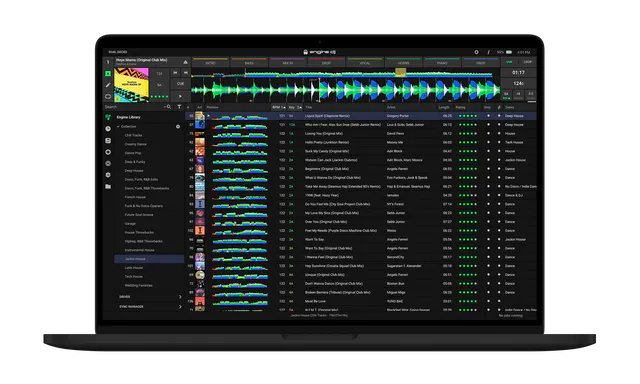
New Features
- RGB Waveforms - Choose between Engine’s classic tri‑band waveforms or full‑color RGB waveforms.
- Import Assistant - Quickly and easily import your music library from Serato, Apple Music / iTunes, rekordbox, or Traktor using a guided, step‑by‑step workflow.
Improvements and Fixes
- Fixed an issue where drag‑and‑drop actions were not permitted.
- Fixed an issue where some tracks were missing the Stems column icon.
- Fixed an issue where the Stems processor could fail to download in certain scenarios.
- Fixed an issue where the Stems list file size was reported incorrectly in some cases.
- Fixed an issue where keyboard shortcuts were missing from tooltip dialogs.
- Fixed an issue where album artwork was not displayed in History lists.
- Fixed a crash that could occur when using Auto‑Relocate.
- Fixed an issue where Engine DJ could fail to install after a fresh Windows 11 installation.
- Fixed an issue where closing Engine DJ during stem rendering could cause rendering to fail.
- Fixed an issue where the Unsupported Sample Rate dialog prevented the Stems Support Download dialog from appearing.
- Fixed an issue where the Maintain Play State option (Engine OS only) was visible in Desktop settings.
- Fixed an issue on macOS where certain drives could not be safely ejected.