
2getheraudio has been actively testing all applicable software products with each beta release of macOS 26 Tahoe. We understand how important it is for all our users to know exactly what works before they make the jump to any new updates. Please refer to this article for all 2getheraudio Hardware & Software compatibility with macOS 26 Tahoe.
Supported Software
All compatibility testing for macOS 26 Tahoe is performed on Intel and base-level Apple Silicon processors.
Any product not listed below is not considered supported with macOS 26 Tahoe systems.
All updates for 2getheraudio are accessible via the inMusic Software Center - Visit THIS page to download it
Plugin Instruments | ||||||||
| Product | Version | Intel | Apple Silicon | VST2 | VST3 | AU | AAX | Auth Type |
| Cheeze Machine 2 | 1.1.5 | Supported | Supported | ✓ | ✓ | ✓ | ✓ | inMusic |
| Cheeze Machine PRO | 1.3.5 | Supported | Supported | ✓ | ✓ | ✓ | ✓ | inMusic |
| CL4P Maker | 1.1.5 | Supported | Supported | ✓ | ✓ | ✓ | ✓ | inMusic |
| G8TOR | 1.1.5 | Supported | Supported | ✓ | ✓ | ✓ | ✓ | inMusic |
| K1CK Synth | 1.2.5 | Supported | Supported | ✓ | ✓ | ✓ | ✓ | inMusic |
| OpZilla | 1.2.5 | Supported | Supported | ✓ | ✓ | ✓ | ✓ | inMusic |
| RE4ORM | 1.2.5 | Supported | Supported | ✓ | ✓ | ✓ | ✓ | inMusic |
| SN4RE Drum | 1.1.5 | Supported | Supported | ✓ | ✓ | ✓ | ✓ | inMusic |
| TrickyClav 2 | 1.1.5 | Supported | Supported | ✓ | ✓ | ✓ | ✓ | inMusic |
Plugin FX | ||||||||
| Product | Version | Intel | Apple Silicon | VST2 | VST3 | AU | AAX | Auth Type |
| RE4ORM FX | 1.2.5 | Supported | Supported | ✓ | ✓ | ✓ | ✓ | inMusic |
| RICH | 1.2.5 | Supported | Supported | ✓ | ✓ | ✓ | ✓ | inMusic |
| RICH Drums | 1.1.5 | Supported | Supported | ✓ | ✓ | ✓ | ✓ | inMusic |
| Space Duck | 1.1.5 | Supported | Supported | ✓ | ✓ | ✓ | ✓ | inMusic |
| ST3REO | 1.1.5 | Supported | Supported | ✓ | ✓ | ✓ | ✓ | inMusic |
| V1NYLLA | 1.1.5 | Supported | Supported | ✓ | ✓ | ✓ | ✓ | inMusic |
How do I prevent my system from updating automatically?
Please be sure to check that your operating system is not enabled to update itself automatically. While this can be a useful feature for some, anyone who relies on the stability of their software tools should prefer control over which base operating system is installed on their system.
Automatic updates will not account for software compatibility before updating, which could lead to problems with stability and other functionality if your gear is not ready for the changes in the operating system.
To avoid any delays or downtime, it's best to deliberate when making the decision to update and use the opportunity to check that all your software tools will be compatible before making the jump. To turn off automatic updates for macOS, please do the following:
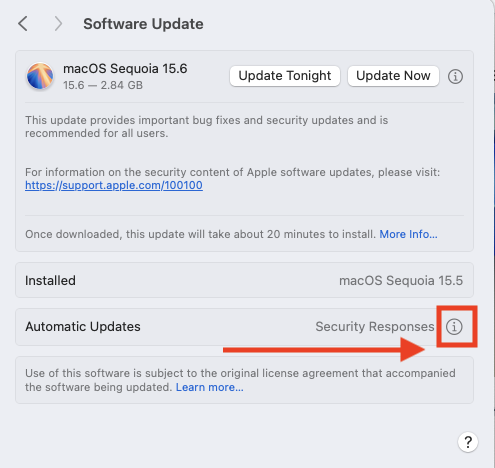
- Navigate to System Settings > General > Software Update
- Click the Information (i) icon beside Automatic Updates
- Uncheck all boxes below:
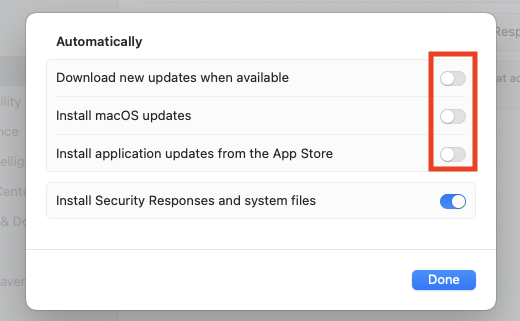
- Click Done to apply the changes